
Arizona State Fair
Arizona State FairEvents
3.814.00 Reviews
- Version
- 3.0.0
- Installs
- 10.00K
- Age Rating
- Everyone
Screenshots
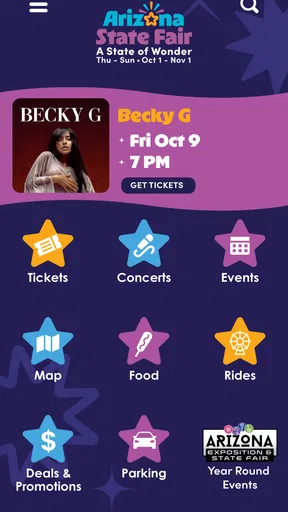
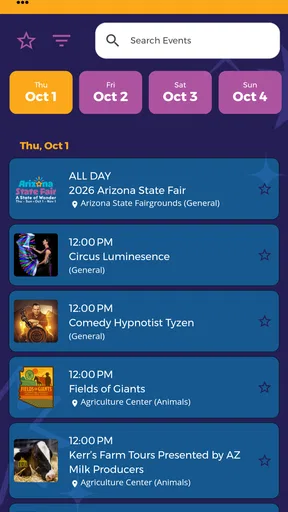
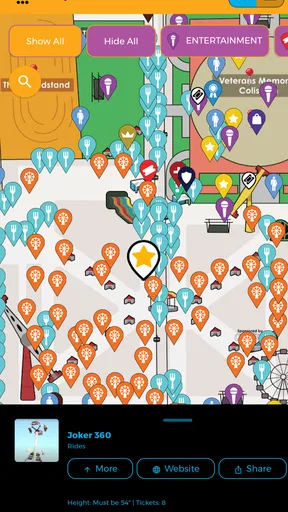

Our Review of Arizona State Fair
 Analysis by Appyee
I found Arizona State Fair most useful when I treated it as a shared planning tool rather than something to open only after arriving at the fairgrounds. It is an events app from Arizona State Fair that brings schedules, maps, discounts, games, and other fair-related information into one place. That combination sounds simple, but it addresses a real problem: a fair visit usually involves several people, different interests, changing plans, and a lot of walking.
My first impression was that the app makes more sense for a household or group than for a solo visitor who already knows exactly where to go. One person can check what is happening, another can look at the map, and someone else can keep an eye out for discounts. I would not call it a complete replacement for every planning method, but it is a convenient companion for turning a loose outing into a more manageable day.
How it works for a shared fair day
A realistic use case is a family arriving with different priorities. One person may care about scheduled entertainment, a child may be interested in games, and another adult may want to find food areas or make better use of discounts. Instead of passing around screenshots or searching through unrelated pages, the group can use the same app as a common reference point.
I especially like that the app combines planning and on-site orientation. A schedule is useful before leaving home, while a map becomes more valuable once everyone is moving around. Discounts can influence what the group chooses to do, and the games section gives younger visitors another reason to interact with the app between activities. These parts serve different moments of the visit, so the app does not depend on one feature carrying the whole experience.
The practical benefit is coordination. If the group separates for a while, the schedule and map can help each person understand the plan without requiring one person to explain everything repeatedly. I would still agree on a meeting place before entering, because an app is not a substitute for a clear backup plan in a crowded event. That small habit makes the digital information much more useful.
The strongest use of this app is reducing small decisions during a busy day. Rather than asking what comes next, where something is located, or whether a discount is worth checking, I can consult the relevant section and move on. That may sound minor, but those interruptions add up when a group is tired or when children are eager to get somewhere.
Setting it up before anyone starts making plans
I would install Arizona State Fair before the visit, not while standing at the entrance. The app is free, which removes an obvious barrier to trying it, and it is suitable for Everyone. It runs on Android devices using Android 6.0 or later, so many older phones can still be considered for shared household use.
For a family using several devices, I would begin by deciding who is responsible for checking the schedule and who will use the map during the visit. That is not an app setting; it is simply a sensible division of responsibility. Without it, several people may assume someone else has checked the next activity, or everyone may keep looking at different information.
I also recommend opening the main sections before leaving home. A quick look at the schedule can help identify the activities that matter most, while checking the map gives everyone a basic sense of the layout. If discounts are important to the group budget, review them before making spontaneous purchases. This turns the app from a last-minute lookup tool into a preparation aid.
One useful trade-off is that shared use can be more efficient than giving the app to every child. An adult can handle schedule decisions and let a child explore the games section on a nearby device when appropriate. This keeps the planning side focused while still allowing younger visitors to enjoy the more playful part of the experience.
I would also avoid assuming that every member of the household needs the same level of access or attention. A person who is only interested in one performance does not need to study the whole app. Someone managing the day may want the broader view, while another visitor may only need the map. Keeping those roles clear makes the app feel less cluttered.
Using schedules and maps without overplanning
The schedule is most valuable when used as a framework rather than a strict timetable. Fair visits rarely follow a perfect sequence. Lines, meals, weather, tiredness, and unexpected discoveries can all change the plan. I would choose a few priorities, note the general timing, and leave room between them instead of trying to fill every part of the day.
That approach also makes the map more useful. A map is not only for finding a destination; it can help reduce unnecessary backtracking. If the group knows that two desired stops are in different areas, it may make sense to handle them during the same stretch of the visit. This is one of the less obvious benefits of combining the schedule with location information: the app can support decisions about order, not just provide isolated facts.
For households with different walking speeds, map planning matters even more. I would build in a meeting point near a recognizable area rather than relying on everyone to stay together constantly. The group can then split briefly without turning every separation into a search. The app supports orientation, but the meeting-point decision still needs to come from the people using it.
I would not use the schedule as proof that the day will run exactly as expected. Event information can be useful while still requiring flexibility. If a favorite activity does not fit the moment, it is better to move to a nearby option than to make the entire group wait uncomfortably. The app helps with choices; it does not remove the need for judgment.
Another practical tip is to check the schedule again during natural pauses, such as while eating or resting. That is less disruptive than having everyone stop in the middle of a crowded walkway. It also gives the group a chance to agree on the next move, which is especially helpful when children or older relatives have different energy levels.
Discounts, games, and the balance between adults and children
The discounts section gives the app value beyond navigation. For an adult organizing a household outing, savings can affect which purchases feel reasonable. I would check this area before the visit and again when deciding whether an unplanned purchase fits the budget. The important point is to use discounts as part of planning rather than treating them as a reason to buy something automatically.
That distinction matters with children. A child may see the app as a source of games and entertainment, while an adult may be using it to manage time and spending. Both uses can coexist, but they should not be confused. I would let younger users explore the playful material while keeping purchase decisions and schedule changes with the adults responsible for the day.
The games section is a nice change of pace, particularly during moments when the group is waiting or taking a break. It gives the app a little more personality than a basic event guide. Still, I would view it as an extra rather than the main reason to install the app. Visitors who only want games may find a dedicated entertainment app more focused, while fairgoers benefit from having the games alongside practical information.
A less obvious household advantage is that the app can give a child a small role without handing over control of the entire outing. For example, an adult can ask a child to look through the game area or help identify a preferred activity, then make the final decision together. This can make the visit feel collaborative while preserving sensible boundaries around spending, movement, and timing.
I would also be careful about letting discounts drive the route too strongly. A deal is not necessarily worthwhile if it sends the group across the fairgrounds when everyone is already tired. The best choice may be a less attractive discount that fits naturally into the existing plan. That is where personal judgment matters more than simply collecting every available offer.
Age context, trust, and shared-device boundaries
Because the app carries an Everyone content rating, it is broadly suitable for a general audience. In a household setting, that makes it easier to introduce without treating it like an adult-only planning tool. However, an age rating does not decide how a family should use a device. Adults still need to decide whether a child may browse independently, use the games, or handle the phone while walking.
I would not hand a phone to a young child in a crowded area and expect the app to solve supervision. The app can help with information, but it does not replace an adult’s attention, a meeting plan, or ordinary awareness of surroundings. If a child is using it, I would do so during a pause and keep the device within the household’s normal rules.
Shared-device use also raises a simple boundary question: whose phone is being used for the important information? I prefer one adult device to act as the reference point for schedules and discounts, with other devices used for occasional checking. That reduces confusion when people compare screens and prevents the group from treating every individual interpretation as a change to the plan.
Trust is relevant in another way. If a child finds an appealing discount or game, an adult can review it together with them instead of dismissing it or accepting it immediately. This creates a useful habit: the app becomes a starting point for a conversation, not an authority that makes decisions on behalf of the household.
For older relatives or visitors who are less comfortable with apps, I would use it as a support tool rather than requiring them to learn every section. Show them the map or the next planned activity, then keep the device available for the person coordinating the visit. The app works best when it adapts to the group’s comfort levels instead of making everyone interact with it equally.
Where it is better than usual alternatives
The usual alternative is to rely on a web browser, printed material, memory, or messages shared among several people. Each option has a weakness. A browser can require more searching, printed information is less convenient to carry and update, memory is unreliable during a long day, and group messages can scatter schedule details across a conversation.
Arizona State Fair has an advantage because its schedule, map, discounts, and games are presented as parts of one fair-specific experience. I do not have to switch between a general map, a separate calendar, and unrelated pages as often. That single-purpose design is particularly helpful for a household that wants one shared reference without building its own planning system.
It is not automatically better for every visitor. Someone who already has a carefully prepared itinerary may prefer a notes app or calendar because those tools allow broader customization. A person who only wants directions may prefer a general mapping service. Someone attending briefly may not need the games or discount material. The app earns its place when the fair itself is the focus and the group wants several kinds of information together.
I also see a difference between this app and a general events platform. A broad events app may be useful for discovering many activities, but it is unlikely to feel as focused for one particular fair visit. Here, the value comes from concentration: the app is designed around Arizona State Fair rather than asking the user to filter through unrelated events.
What I would keep in mind before relying on it
The main limitation is that an all-in-one event app can still leave the user doing some interpretation. A schedule tells me what to consider, but I still need to decide what fits the group. A map helps with orientation, but I still need to choose meeting points and account for walking effort. Discounts can inform spending, but they do not create a budget.
There is also a risk of overusing the phone. If everyone keeps checking the screen, the app can become a distraction from the fair itself. I would use it at deliberate moments: before leaving, during breaks, and when the group needs to make a specific decision. That rhythm preserves the practical benefit without turning the visit into a day of constant phone handling.
People who expect extensive personal accounts, detailed household controls, or a fully customized itinerary may find the experience less suitable than a general planning tool built around those needs. I would choose a calendar and shared notes for a group that needs detailed task assignment or long-term coordination. This app is more naturally a visit companion than a complete household management system.
Its free price makes experimentation easy, and the current version is 3.0.0. The app has an average rating of 3.8 from around thirty-six ratings, with roughly fourteen written reviews, and it has passed ten thousand installs. I read those figures as signs of a modest, focused event utility rather than a massive platform with universal appeal. That matches my experience: its usefulness depends heavily on whether I am actually planning an Arizona State Fair visit.
The release date of September 2, 2022, also places it in the category of an established event companion rather than something I would expect to behave like a constantly evolving social network. I would judge it by how well it supports the visit, not by expecting the depth of a general-purpose travel or family-planning service.
My household verdict
I would recommend Arizona State Fair to families, friends, and other groups who want one fair-specific place for schedules, maps, discounts, and lighter entertainment. The strongest reason to use it is coordination: it gives adults a shared reference while leaving room for children to engage with the games section in an age-appropriate way.
I would prepare with it before arriving, agree on a meeting point, identify a few priorities, and check discounts without letting them dictate the entire day. During the visit, I would use the map to reduce backtracking and revisit the schedule during breaks. Those habits bring out more value than simply opening the app once at the entrance.
I would skip it if my visit were extremely brief, if I wanted a fully customizable family planner, or if I already had another method that handled the exact information I needed. For everyone else attending the fair, the combination of practical planning and shared-device flexibility makes it a sensible free download.
My final view is positive but measured. This is not an app that replaces common sense, supervision, or a backup plan. It is better understood as a compact companion that helps a household make decisions together. When used that way, Arizona State Fair can make a crowded, multi-person outing easier to coordinate without forcing the whole experience onto a screen.
Verdict
Strengths of Arizona State Fair
- Detailed event schedules make it easy to plan visits and find favorite attractions.
- Useful maps help locate rides, food stands, stages, and restrooms around the fairgrounds.
- Push notifications can highlight performances, deals, and important event updates.
- Family-friendly listings make it easier to discover activities suitable for different age groups.
- The app puts fair information in one place, reducing the need to search multiple websites.
Limitations of Arizona State Fair
- Some information may become outdated if schedules or vendors change at short notice.
- Large event maps can feel crowded and take time to navigate on smaller phone screens.
- Notifications may become excessive during the busy fair period.
- The app is less useful outside the annual Arizona State Fair season.
- Some features may depend on a reliable internet connection at the fairgrounds.
Similar Picks in This Category
View All
Easy Quran Mp3 Audio Offline
Muslim Worldapp4.7

Invitation Maker: Cards & RSVP
Greetings Island4.9

StubHub - Live Event Tickets
StubHub4.3

Fever: Events & Tickets
Fever Labs4.7

Epic Freebie Games Radar
Arioch Pds - Apps & Games4.4

Invitation card Maker, Design
Splendid App Maker4.9
Frequently Asked Questions
What is the Arizona State Fair app used for?
The Arizona State Fair app is designed to help visitors plan and enjoy their trip to the fairgrounds. It can provide useful information such as event dates, opening hours, attractions, entertainment schedules, food and vendor details, maps, ticket information, and other visitor updates. It is especially helpful for checking what is happening during your visit instead of relying only on printed signs or brochures.
Can I buy Arizona State Fair tickets through the app?
Depending on the current version and the fair’s policies, the app may provide access to official ticket information or direct you to the authorized online ticketing service. Before purchasing, check that the link leads to the official Arizona State Fair website or ticket provider. Ticket prices, admission rules, discounts, ride passes, and special offers can change, so reviewing the latest details before visiting is recommended.
Does the Arizona State Fair app include a map and attraction information?
A major benefit of using the app is having fairground information available while walking around the venue. It may include a map showing stages, rides, food areas, exhibits, restrooms, entrances, and other important locations. Attraction descriptions and schedules can also help you organize your day, although some information may change because of weather, maintenance, crowd conditions, or event scheduling.
Does the app work without an internet connection?
Some features may remain available after information has loaded, but users should not assume that the entire Arizona State Fair app works offline. Live schedules, announcements, ticket links, maps, and updates may require mobile data or Wi-Fi. For a smoother visit, open the app before arriving, review important details in advance, and keep your ticket information accessible in case connectivity is limited at the fairgrounds.
Is the Arizona State Fair app free and safe to download?
The official Arizona State Fair app should generally be free to download, although attending the fair, purchasing rides, food, parking, or other services may involve separate costs. To avoid unofficial or misleading applications, download it only from the Apple App Store or Google Play and verify the publisher, ratings, permissions, and recent update information before installation. Keep your device’s operating system updated for better security and compatibility.
